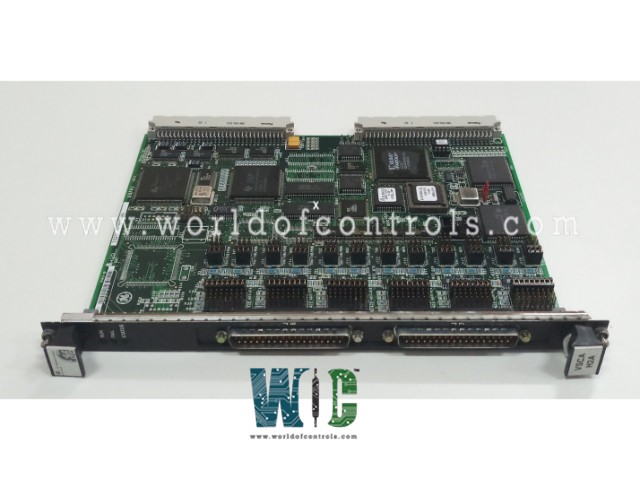
IS200VSCAH2ABA - Serial Communication I/O Board

IS200VSCAH2ABA - Serial Communication I/O Board IS200VSCAH2ABA - Serial Communication I/O Board

World Of Controls understands the criticality of your requirement and works towards reducing the lead time as much as possible.

IS200VSCAH2ABA - Serial Communication I/O Board is available in stock which ships the same day.

IS200VSCAH2ABA - Serial Communication I/O Board comes in UNUSED as well as REBUILT condition.

To avail our best deals for IS200VSCAH2ABA - Serial Communication I/O Board, contact us and we will get back to you within 24 hours.

SPECIFICATIONS

Part No.: IS200VSCAH2ABA
Manufacturer: General Electric
Country of Manufacture: United States of America (USA)
MPU pulse rate range: 2 Hz to 20 kHz
MPU input circuit sensitivity: 27 mV pk
Technology: Surface mount
Temperature: -30 to 65oC
Product Type: Serial Communication Input/Output Board
Availability: In Stock
Series: Mark VI

Functional Description

IS200VSCAH2ABA is a serial communication input/output board developed by GE. It is a part of Mark VI control system. It is designed to provide I/O interfaces with external devices, supporting RS-232C, RS422, and RS485 serial communication protocols. The current version available works in conjunction with the DIN-rail-mounted Serial Communications Terminal Board (DSCB) to connect external devices, such as intelligent pressure sensors like the smart Honeywell pressure transducers and Kollmorgen electric drives.

Product Features

  • Connectivity between the board and the terminal board is established through the J6 and J7 front panel connectors. These connectors are parallel-connected, each utilizing a 37-pin D shell connector, which uses group-shielded twisted pair wiring to ensure reliable data transmission.
  • On the DSCB side, the connection to external devices is made via the Euro-Block (Phoenix-type terminal block) using screw terminations and AWG18 twisted shielded pair wiring. This setup is designed for secure and stable connections, with the DSCB terminal board including two screws for SCOM (ground) that must be properly connected to a good shield ground.
  • The terminal board supports interfacing with external devices over significant distances. For RS422 and RS485 protocols, it can manage communication distances of up to 1000 feet, with baud rates reaching up to 375 kbps.
  • For RS-232C connections, the distance is more limited, with a maximum of 50 feet or 2500 pF of cable capacitance, including the cable from the VSCA to the DSCB. However, for extended distances, the system supports the use of short-haul modems. This combination of features makes the VSCA and DSCB boards a versatile solution requiring robust serial communication capabilities.

Installation Guidelines

  • Power Down the VME I/O Processor Rack: Before beginning the installation process, ensure that the VME I/O Processor Rack is fully powered down. This is a crucial step to avoid any electrical damage to the board or the rack and to ensure the safety of the installer. Verify that all power sources on the rack have been disconnected.
  • Slide in the Board: Carefully align the board with the designated slot in the VME I/O processor rack. Gently slide the board into the slot, ensuring that it is correctly oriented and that the edge connectors are in line with the rack's backplane connectors.
  • Secure the Board with the Levers: Once the board is partially inserted, use your hands to push the top and bottom levers of the board inward. These levers are designed to help seat the board’s edge connectors firmly into the backplane connectors. Ensure that the board is fully seated to maintain a stable and reliable connection within the rack.
  • Tighten the Captive Screws: After the board is securely seated, locate the captive screws at the top and bottom of the front panel of the board. Use an appropriate screwdriver to tighten these screws, which will hold the board firmly in place within the rack. Tightening these screws is essential to prevent any movement of the board during operation, which could lead to disconnection or damage. 

The WOC team is always available to help you with your Mark VI requirements. For more information, please contact WOC.

Frequently Asked Questions

What is IS200VSCAH2ABA?
It is a Serial Communication Input/Output Board developed by GE under the Mark VI series.

What should I do if the board does not seem to fit into the slot?
If the board does not easily slide into the slot, do not force it. First, double-check that the board is correctly aligned with the slot. Ensure that it is properly oriented and that the edge connectors are in line with the backplane connectors. If alignment is correct and it still doesn't fit, inspect the slot and the board for any obstructions or damages.

How do I know if the board is fully seated in the backplane connectors?
You can tell the board is fully seated when you push the top and bottom levers inward and feel a firm connection. The board should sit flush with the front of the rack, and there should be no visible gaps between the board and the backplane connectors.

What are the captive screws, and why are they important?
The captive screws are located at the top and bottom of the front panel of the board. They are designed to hold the board securely in place within the rack, preventing any movement that could disrupt the connection. Tightening these screws ensures that the board remains stable during operation.